NutrieScan: healthy choices, one scan at a time
A food-scanning app that helps busy shoppers choose healthier food in the grocery aisle, without decoding labels.
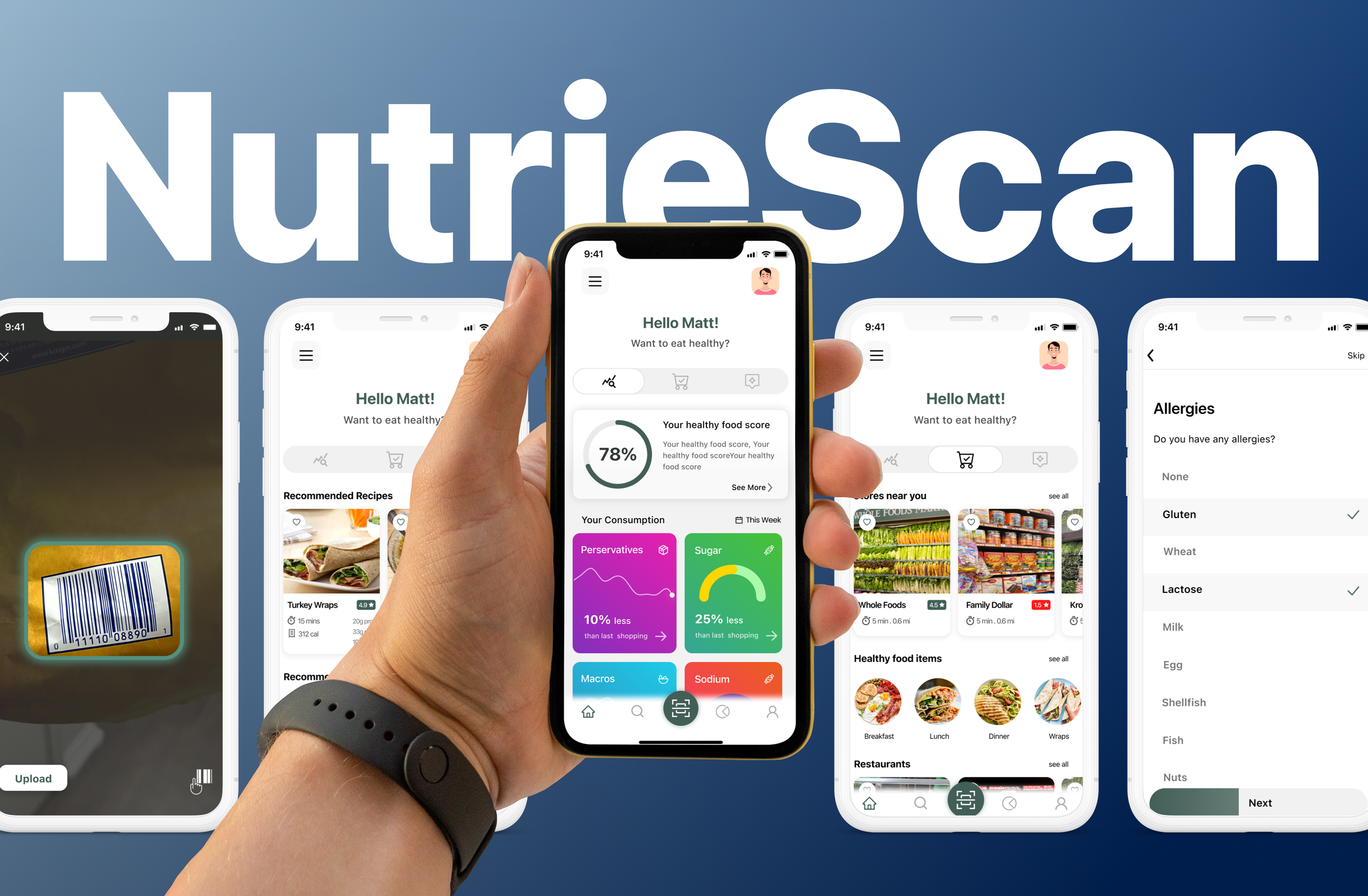
In the grocery aisle, time is short and labels are confusing.
The problem
Shoppers want a guide through the maze of options and a way to learn healthier eating. But time is scarce and labels are confusing. They need something that simplifies the choice.
Why it matters
- No timeYoung adults do not have the time to buy and cook a healthy, complete diet.
- Too many optionsThe sheer number of products in a store makes healthy decisions hard.
- Labels are hard to readPeople do not understand the health benefits and implications behind nutrition label wording.
The solution
A health score out of 100
Scan a barcode, a product label or a shopping bill and get a score from our own rubric.
Healthy picks, highlighted
On entering a store, the app surfaces the healthy products available there.
Why, how much, what instead
It explains why a product is unhealthy, suggests how much is fine, and offers healthier alternatives.
Personal from the first screen
An onboarding questionnaire on diet, fitness goals, allergies and health conditions tailors the app to each person.
Three stores, eight shoppers, one pattern.
We watched how people shop and listened to why, then looked for what held them back.
Observations
We observed shoppers at Family Dollar, Kroger and Whole Foods. Family Dollar had more frozen, less healthy options, Kroger offered a mix, and Whole Foods emphasised fresh produce. The range showed us how different budgets shape what ends up in the basket.
Interviews
We interviewed eight people: college students, young professionals, families and retirees. The spread helped us test our hypotheses against very different shopping lives.
What we saw in the stores
Label literacy
People prefer products with ingredient labels they can understand.
Store analysis
Across Family Dollar, Kroger and Whole Foods, packaged long-shelf-life items outnumbered fresh produce.
Corporate influence
Large food companies encourage bulk buying, with little price difference between large and small sizes.
Consumption patterns
Canned and frozen food is popular for busy or tight-budget lives, which puts organic out of reach.
Generational impact
Unhealthy habits set in childhood can lead to health issues, a cycle people try to break as they age.
Information gap
People moving to healthier food lack nutritional information and the health implications of what they buy.
What we heard
The key problems: lack of time, not understanding label terms, not knowing what to cook, not knowing a product's shelf life, being unaware of health implications, not knowing what to expect from a store, and too many options.
“I am a full-time software developer and I hardly get the time to shop. So I go to the store and pick out all the frozen options.”
“If I can't read or don't understand the ingredients written on the label of the product, I don't buy it!”
“As a student, I usually do not have the budget to eat healthy. So, I go for whatever cheap options I can see in the store.”
Where that pointed us
- Make labels easy to understandLack of clarity on how to show people the implications of unhealthy products.
- Prioritise and create personasDifferent users have different problems.
- Declutter the store, virtuallyToo many products in stores.
Two shoppers, one clear idea.
We turned the research into personas, then into a pile of ideas, then into one app worth building.
Brainstorming solutions
The team generated 75 ideas across suggestive apps, analysis apps, information apps, AR/VR and AI, games and social apps. We then did the same for features and prioritised the final set.
We chose a bespoke app that finds healthy groceries through scanning, tailored to each person's schedule, health status and goals, with clear visuals of what a product means for their health.
Information architecture
We decided where each feature lives and how the interface flows, before drawing screens.
Colour and type
A deep green for trust and health, a warm yellow for emphasis, and quiet neutrals so product information stays readable.
From low-fidelity flows to a finished prototype.
Low-fidelity design
3 flowsHigh-fidelity design
5 areasFour people thinking aloud changed five things.
Before designing the final screens we chose four participants who closely matched our target persona. Each ran think-aloud sessions on the prototype, followed by a short interview.
Privacy, on the user's terms
A non-intrusive popup asks for location only when someone searches for a store, not up front.
A clear Save button
We replaced the ambiguous social-media-style save icon on the product page with a labelled button.
An icon instead of 'Food'
On the landing page an icon replaced the vague word, making Food, Suggestions and Health overview easier to tell apart.
A shorter, livelier survey
The onboarding questionnaire got fewer questions and more engaging interactions.
Multiple answers allowed
People can pick several options for one question, matching how they actually answer.
A tool that helps people build healthier eating habits.
We tested the prototype with people who match its target audience to gauge how well it works and where it could succeed.
Reflection
The project gave me a chance to run field studies and interviews with the people we were designing for. It taught me how much user comprehension matters when designing something new.
What comes next
- Longer testingExtend user testing to see whether the app builds lasting purchasing and eating habits.