All-in-one event management platform
One workspace for venue owners and event managers to book, message, assign tasks and get paid. Designed with GravityDrive, an experience design consultancy in Fishers, Indiana, after field research at five event venues.
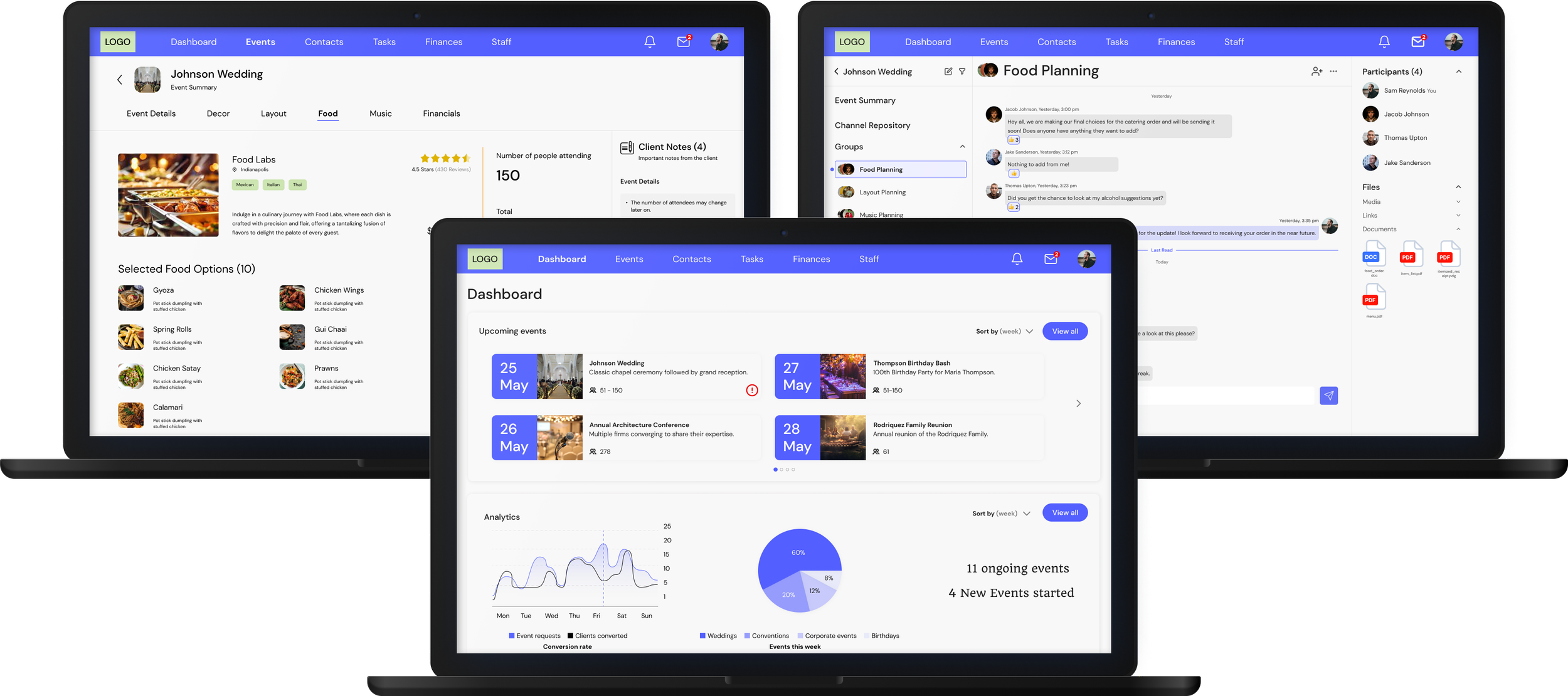
Customisation is what people want, and what overwhelms them.
The problem
An event planning app needs venue selection, messaging and secure payments, and it has to offer deep customisation without overwhelming the people using it. Working with venue owners and connecting to payment gateways were the two hardest constraints.
The approach
We started in the field, not in Figma. We visited venues, interviewed the people who run them, then designed and tested a prototype across eight months with client feedback at every stage.
- 01
Customise without overwhelm
A single event customisation flow for decor, food, DJ and more, with the cost visible as it changes.
- 02
One open channel
Venue owners, organisers and staff talk in the same place, tied to the event they are discussing.
- 03
One payment path
Every part of an event is paid for through one consolidated, secure process.
Seven products, a literature review and five venue visits.
Three kinds of research, each answering a different question: what exists, what is known, and what actually happens on the floor.
Competitive analysis
We compared seven products used to plan and manage events, scoring them against each other with Harvey balls.
Literature review
We studied how technology makes event marketing more effective and easier to manage, looking at the why, who, when, where and what of each strategy.
Field research and interviews
We visited five event spaces across Zionsville, West and Downtown Indianapolis, and interviewed two venue owners and three event managers.
Most venues still run on spreadsheets
Most of the venues we visited track upcoming events in Excel sheets. A streamlined digital booking system is a clear need.
Budget has to stay visible
80% of participants wanted a system that shows budget limits, and budget increases, as an event is customised.
Organisers want shared resources
Event organisers showed strong interest in a system that helps them manage a directory of venue resources.
Venues lack insight tools
None of the venues had analytics. Even simple ones would help them decide how to promote events.
Two users, one shared system.
Venue owners and event organisers want different things from the same event. We designed for both from the start.
Information architecture
We mapped where every feature lives and how a person moves between them, before drawing a single screen.
Colour and type
A calm base so the customisation options can do the talking, with one confident primary for actions.
From paper sketches to six working modules.
We prototyped rigorously and refined every round through in-team reviews and client feedback, until the concepts matched what users told us they needed.
Low-fidelity ideation
Scroll to see more →High-fidelity screens
6 modulesAn overview of upcoming events, analytics, schedule and tasks, so a manager knows what needs attention first.
Where people got stuck, and why.
Before finalising screens we ran internal reviews and think-aloud sessions: five participants, 35 minutes to an hour each, with interviews before and after.
- Task 1Identify the most important task and complete it.
- Task 2Create a high-priority task and assign it to a co-worker.
- Task 3Find the message with the request, make the change, then tell them it is done.
Everyone found the task and understood it, but could not connect it to its event.
Creating a task was easy. Setting priority and linking the task to an event was not.
They struggled to find the Messages icon, the right chat, and the link between that chat and the event to change.
What we learned
- Messages vs contactsPeople confused the two. The navigation needs clearer labels and separation.
- Event associationPeople and conversations need a stronger, visible link to the events they belong to.
- Universal searchSearch fields appeared in several places and worked on different keywords.
- Information overloadThe messaging section carried too much on screen at once.
What people liked
- All-inclusiveA one-stop solution for messaging, event tracking, customisation and more.
- Gentle learning curveLess complex than similar applications people had used.
- Intuitive UIFriendly and easy to remember.
- CustomisationPeople liked choosing decor, food and a DJ inside the same system.
A high-fidelity prototype that helps teams plan, organise and manage staff for any type of event.
The system was tested with event organisers who have over a decade of experience and with venue owners. There is a clear need for an all-inclusive event system that supports both sides.
Reflection
Visiting venues and speaking to organisers and owners showed me how events really run and where they break. That research let me go deep on the problems in event management before designing anything, and months of iterating with client feedback made the system far stronger than a first draft would have been.
What comes next
- Fix the messaging flowResolve the messages, contacts and event-relation issues found in testing.
- Test the new prototypeRun another round with the latest changes.
- Fast venue onboardingDesign an efficient, quick onboarding for venues.
- Staff sectionAdd a place to manage staff.